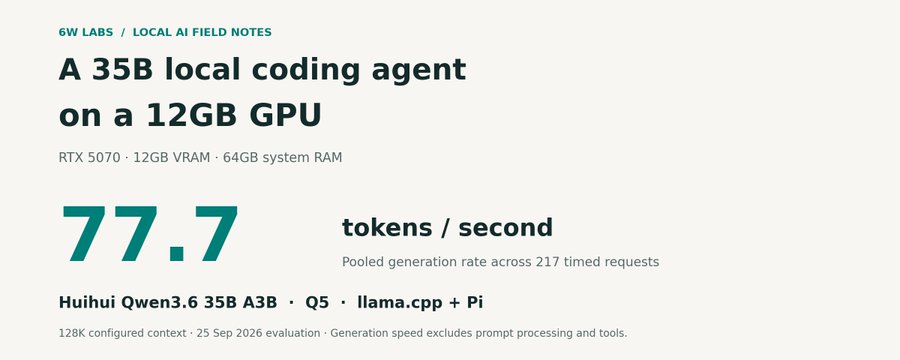
We've been working on that at 6w Labs with an RTX 5070, 12GB of VRAM, and 64GB of system RAM. The setup runs a Q5 version of Huihui's Qwen3.6-35B-A3B through llama.cpp, with Pi providing the coding tools and conversation history.
Across a 13-task run, it pooled 77.7 generated tokens per second. In daily use, I regularly see performance around that same 80 tok/s mark.
Here's the hardware, the configuration, and the tuning result that surprised us the most.
The machine and the model
| Component | Configuration |
|---|---|
| GPU | NVIDIA RTX 5070, 12GB VRAM |
| CPU | AMD Ryzen 7 9700X, 8 cores |
| System RAM | 64GB installed |
| Model | Huihui Qwen3.6-35B-A3B abliterated MTP GGUF |
| Quantization | Q5_K, approximately 25.3GB on disk |
| Inference engine | llama.cpp, commit 26394b4 |
| Agent | Pi 0.84.2 with our context-budget adapter |
| Configured context | 131,072 tokens |
This is a mixture-of-experts model: approximately 35 billion parameters in total, with about 3 billion active per token. That reduces the computation needed for each token, but the complete weights still need somewhere to live. Qwen model details here.
The system RAM is essential to this setup. Our configuration keeps the experts in the first 29 MoE layers on the CPU and offloads the remaining eligible model work to the GPU. It also uses Flash Attention and Q8 key/value caches.
The exact model is the Huihui MTP GGUF variant linked here. These measurements apply to that checkpoint and quantization.
What we measured
We used a 13-task agent run to clock generation and prompt-processing speeds while Pi read files, wrote code, ran commands, and worked through assignments. The tasks included a resumable data pipeline, resource scheduling, code porting, and incident analysis.
The completed September 25 run produced 217 requests with complete server timings, including responses generated before two interrupted attempts were retried.
| Measurement | Result |
|---|---|
| Pooled generation speed | 77.7 tok/s |
| Median request generation speed | 83.7 tok/s |
| Pooled prompt-processing speed | 579.5 tok/s |
| Output tokens reported across timed requests | 247,556 |
| Newly evaluated prompt tokens | 118,454 |
“Pooled” means combining the token counts and timing durations across requests. It gives longer generations their proportional weight. The request median gives every request equal weight, so it answers a different question.
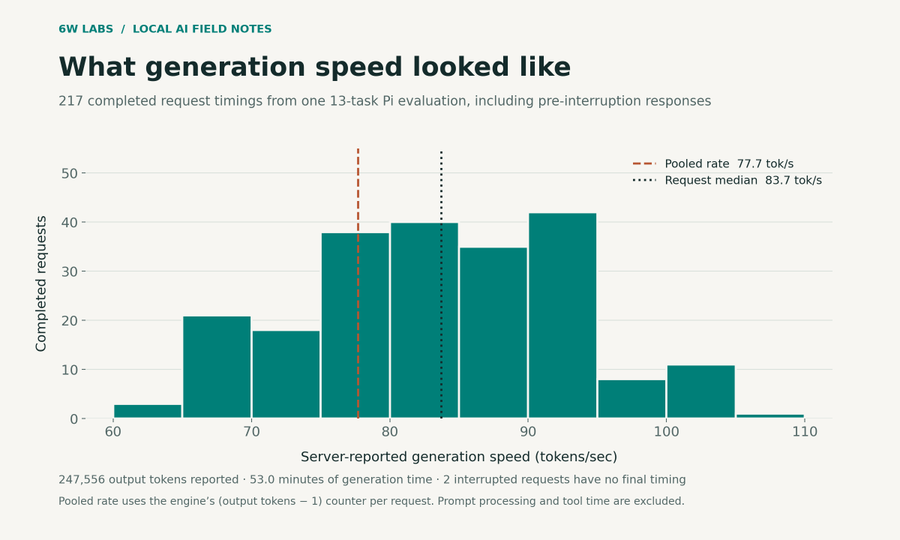
Generation timings exclude prompt processing, tools, and recovery from interruptions. They include reasoning and tool-call output as well as final answers.
Prefill is the work of processing the prompt before generation. Our 579.5 tok/s figure counts newly evaluated tokens; the server was also reusing cached prefixes across requests. It describes this agent workload, with its mix of prompt sizes and cache reuse.
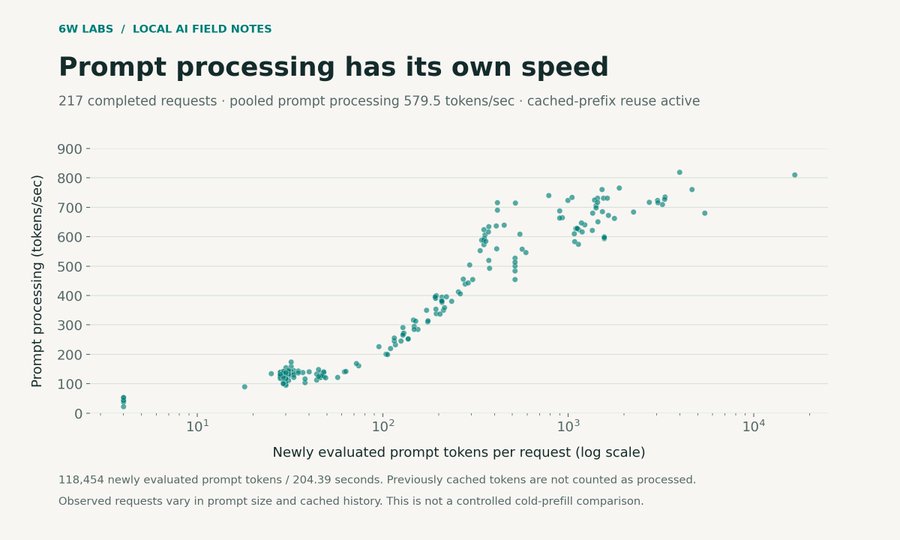
118,454 newly evaluated prompt tokens took 204.39 seconds of recorded prompt-processing time. This is an observed workload result, not a controlled cold-prefill comparison.
The configured context window was 128K, but this timing sample reached roughly 59K tokens of occupied context. The measurements don't establish the same speed at a full 128K window.
Why a shorter draft helped
The model includes a multi-token prediction head. In llama.cpp's MTP speculative mode, it proposes tokens that the target model then verifies. Accepted proposals can reduce generation work; rejected proposals still cost time.
We tried draft caps of 6, 10, and 4 using the same short interval-subtraction prompt, two requests per setting, and a 384-token output limit. Sampling stayed at temperature 1.0, top-k 20, and top-p 0.95.
| Maximum draft tokens | First request | Second request |
|---|---|---|
| 4 | 69.40 tok/s | 71.44 tok/s |
| 6 | 54.64 tok/s | 66.82 tok/s |
| 10 | 41.22 tok/s | 48.16 tok/s |
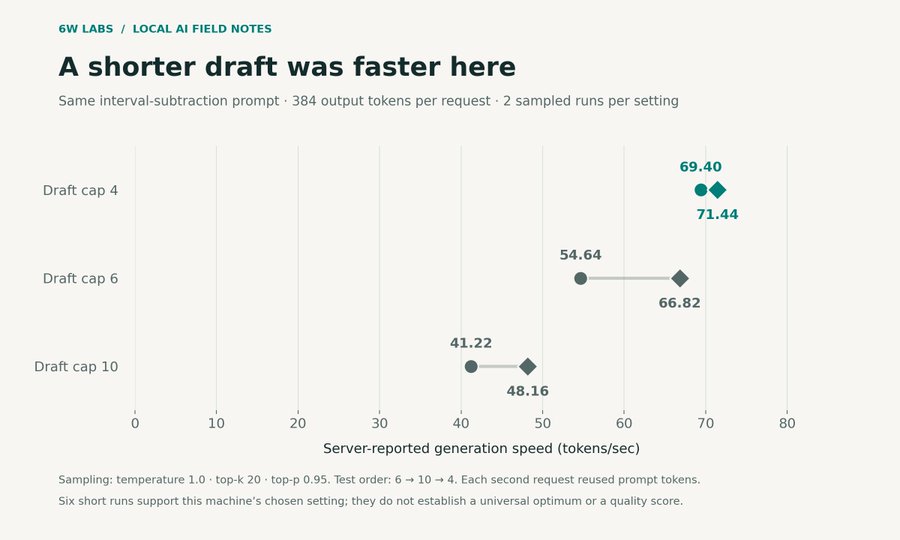
Two sampled requests per setting; the test order was 6, then 10, then 4. Each second request reused prompt tokens. These were short throughput probes, not completed coding evaluations.
A larger draft cap did not help this machine on that prompt. The server accepted about 55–59% of drafted tokens at cap 4, compared with about 27–30% at cap 10. We kept the cap at 4.
Six requests don't establish a universal optimum. They do provide a useful tuning lesson: check accepted drafts and actual generation speed together. Increasing a speculative setting can leave the model doing more work for less output.
The server configuration
This is the configuration behind the setup, using the pinned llama.cpp revision. Adjust the model path to the downloaded Q5_K GGUF:
llama-server \
--host 127.0.0.1 --port 8080 \
-m /path/to/Huihui-Qwen3.6-35B-A3B-abliterated-ggml-model-Q5_K.gguf \
-a huihui-qwen36-35b-a3b-q5 \
--fit off --load-mode none -ngl all \
-c 131072 -np 1 -cb -fa on \
-ctk q8_0 -ctv q8_0 \
-t 8 -tb 8 -b 2048 -ub 512 --jinja \
--n-cpu-moe 29 \
--spec-type draft-mtp --spec-draft-n-max 4
The choices to pay attention to are the CPU/GPU expert split, the memory reserved for context, and the speculative draft cap. They compete for a finite hardware budget. The values above are the working configuration for this machine; a different card or workload can warrant different settings.
Pi connects to the local OpenAI-compatible endpoint. Its model profile declares the same 131,072-token context window, uses the sampler above, and enables automatic compaction with 8,192 tokens reserved and 8,192 recent tokens retained. Our adapter clamps the requested output budget to the estimated remaining context with a 1,024-token margin.
The harness is a separate layer from inference. It owns the tools, instructions, workspace, and saved conversations. A model swap changes the provider profile and runtime settings, so the same working environment can follow us between models. A saved conversation can be replayed; the old model's in-memory cache cannot be carried across.
What the speed makes possible
One assignment was a resumable JSON ingestion pipeline: validate rows, normalize Unicode whitespace, handle revisions and duplicates, and preserve state correctly across batches. Pi completed the task in about 131 seconds, and the resulting implementation passed all four recorded hidden checks.
That's the sort of task I want this system to help with: a concrete job, access to the right tools, and an outcome I can inspect.
Speed still needs to be paired with verification. In this run, all nine coding tasks passed their supplied smoke tests, while six passed every hidden check. The four analysis tasks weren't automatically graded. Those results describe a small custom suite and one completed run with retries; they aren't a general coding benchmark score.
For me, the appeal is having a responsive local model in a reusable agent environment. Inference runs on hardware I control, with no per-token model API charge. Hardware, electricity, and maintenance still have a cost, and the agent's tools can make network requests if they're allowed to.
This setup was built on work from Qwen, Huihui, llama.cpp, and Pi. Our contribution was selecting the configuration, connecting the pieces, and measuring how they behaved on this workstation.
While this isn't the perfect speed and accuracy, this represents a very usable configuration of a local model on hardware that is affordable to most consumers and can be used for many different setups. This is useful AI to us.
If you're running local AI, what GPU and RAM are you using—and where do you feel the wait most: loading, processing the prompt, or generating the response?